
Square Harmonics

Square waves generate harmonics.
So do we.

Precision signal-processing tools for musicians who take tone seriously. Our flagship app, Harmonix, moves neural amp captures from your library straight onto real hardware — exactly, every time.

Square Harmonics
Neural Amp Modeler TONE3000 Hotone · Ampero Sonicake · Pocket Master Android · Live Engine

The product

One flow, from capture to cable.

Harmonix is a guided, five-step pipeline that takes a Neural Amp Modeler capture and lands it — byte-exact — on the hardware pedal in your signal chain.

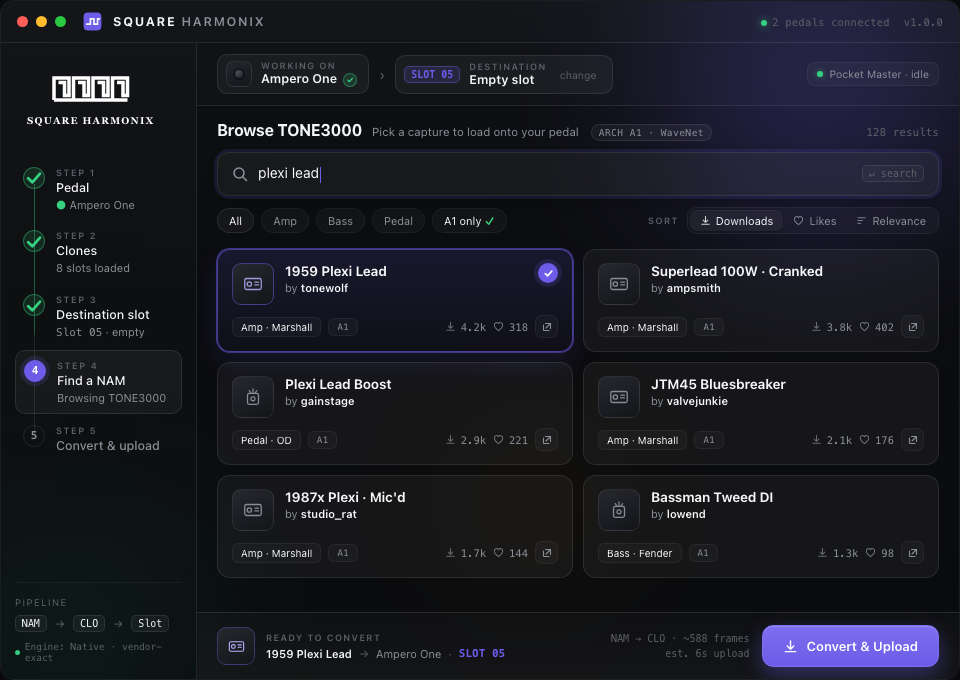
Browse TONE3000

Search a library of thousands of community-captured amp and pedal models directly inside the app, filtered to the architecture your hardware can run.

Vendor-exact conversion

Every capture is converted from NAM to the pedal's native CLO format with a reverse-engineered, byte-validated pipeline — not an approximation.

Direct hardware upload

Slots load straight over USB-MIDI with live transfer progress and a read-back verification pass, so you know the pedal holds exactly what you sent.

Harmonix TONE3000 browser

How it works

A five-step pipeline, not a settings menu.

01

Pick your pedal

Ampero One or Pocket Master — Harmonix detects connected hardware automatically.

02

Choose a clone slot

Read every slot on the device, see what's loaded, pick where the new capture lands.

03

Find the capture

Search TONE3000 by amp, pedal, or player — filtered to your hardware's architecture.

04

Convert & upload

Watch the live console: decode, convert, pack, upload, verify — frame by frame.

Availability

One app. Every rig.

Harmonix runs where you play. Android is live today; desktop and iOS are finishing certification.

Android
Public beta
Download APK
iPhone
Available soon
Notify me
Mac
Available soon
Notify me
Linux
Available soon
Notify me
Windows
Available soon
Notify me

See every step, screen by screen.

Walk through the full Harmonix pipeline — TONE3000 search, live conversion console, hardware upload, and the real-time Android engine — before you install anything.

Open the presentation